
🌍 Net IPTV Upload Playlist channels – The Ultimate Step-by-Step Guide 2025
Are you looking for an easy and reliable way to upload your IPTV playlist to your Smart TV?
Then this is the ultimate guide on Net IPTV upload you’ve been searching for!
Net IPTV is one of the most popular apps for watching IPTV content — available on Samsung, LG, and Android Smart TVs. With it, you can stream thousands of live channels, movies, and series directly over the internet using your M3U playlist or Xtream login.
In this article, we’ll walk you through everything you need to know about Net IPTV upload, how it works, how to add your playlist, and how to get the best out of your IPTV experience in 2025.
🎬 What Is Net IPTV?
Net IPTV is a premium media player app designed to stream IPTV channels from any legal IPTV provider.
It doesn’t host any content itself — instead, it allows users to upload their IPTV playlist (M3U or Xtream) and start watching instantly on their Smart TV.
It’s available on:
- Samsung Smart TVs
- LG Smart TVs
- Android TV
- Firestick
- Android TV Box
With Net IPTV, users can access live TV channels, VOD (Video on Demand), and series from anywhere around the world in HD, 4K, and even 8K quality.
⚙️ Why Choose Net IPTV for Streaming?
Before we go into the Net IPTV upload process, it’s important to understand why this app is one of the most popular IPTV players.
Here’s what makes it stand out:
- ✅ User-Friendly Interface – Clean and easy to navigate, even for beginners.
- ✅ Fast Streaming – Optimized servers reduce buffering and improve speed.
- ✅ Supports Multiple Playlists – Upload and switch between playlists easily.
- ✅ EPG Support – See TV program schedules with Electronic Program Guide.
- ✅ Subtitle & Language Options – Perfect for international viewers.
- ✅ Multi-Device Compatibility – Works on most Smart TVs and Android devices.
It’s no surprise that millions of IPTV users prefer Net IPTV for its simplicity and performance.
📡 Understanding Net IPTV Upload
The Net IPTV upload process is what allows you to connect your IPTV subscription with the app.
Basically, you upload your M3U playlist link or Xtream code login to the Net IPTV system through its official website, and then it syncs automatically to your TV app.
Once your playlist is uploaded, you can enjoy all your channels — live TV, movies, and series — instantly.
Now let’s go step-by-step through the process.
🧩 Step-by-Step: How to Upload Your Playlist to Net IPTV
🖥️ Step 1: Install the Net IPTV App on Your Smart TV
Go to your TV’s app store and search for “Net IPTV”.
On Samsung TVs, open the Smart Hub.
On LG TVs, open the LG Content Store.
On Android TVs or Firestick, search for Net IPTV in Google Play or Downloader.
Download and install the app — it takes less than a minute.
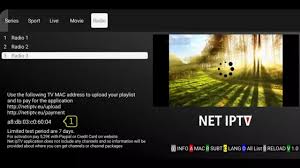
🔑 Step 2: Open the App and Note Your MAC Address
Once installed, open Net IPTV on your TV.
You’ll see a MAC address displayed on the screen (something like 00:1A:79:XX:XX:XX).
Write it down — you’ll need it to connect your playlist to the app later.
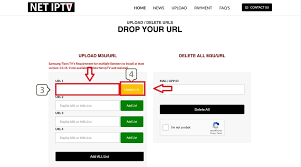
🌐 Step 3: Go to the Official Net IPTV Upload Website
On your phone or computer, open your browser and visit:
👉 www.netiptv.eu/upload
Here’s where you’ll perform the Net IPTV upload process.
💾 Step 4: Enter Your MAC Address and Upload Your Playlist
Once you’re on the site:
- 1. Enter your TV’s MAC address.
- 2. Paste your M3U link or Xtream codes from your IPTV provider (like ours).
- 3. Click Upload or Add Playlist.
You can upload multiple playlists, remove old ones, or refresh your existing list anytime.
Within seconds, your playlist will sync with your TV app.
▶️ Step 5: Restart the Net IPTV App on Your TV
After uploading, return to your Smart TV and restart the Net IPTV app.
You’ll now see your uploaded playlist appear automatically — ready to stream!
That’s it. You’ve successfully completed the Net IPTV upload process.
🎥 How to Get the Best IPTV Experience
To get the most from your IPTV subscription on Net IPTV, you need a reliable IPTV provider that delivers quality streams, fast servers, and stable performance.
That’s where our premium IPTV service comes in.
- We provide:
- ✅ 45,000+ Live Channels (Sports, News, Movies, Series)
- ✅ 190,000+ VOD (Movies & Series)
- ✅ Weekly Updates
- ✅ HD / 4K / 8K Quality
- ✅ Fast & Reliable Servers
- ✅ 24/7 Technical Support
- ✅ Works with Net IPTV, Smart IPTV, IBO Player, Duplex Play, and more
No buffering. No limits. Just smooth, unlimited entertainment.
🌍 Compatible Devices for Net IPTV
One of the biggest advantages of Net IPTV is its wide compatibility.
You can enjoy your uploaded playlists on:
- Samsung Smart TV
- LG Smart TV
- Android TV
- Amazon Firestick
- Android Box
- Windows PC (via emulator)
- Tablets & Smartphones
It’s the perfect choice for users who want a multi-device IPTV solution.
💡 Tips for a Smooth Net IPTV Upload Experience
To ensure everything runs smoothly, follow these pro tips:
- 1. Check Your Playlist Format: Make sure your M3U or Xtream code is correct and active.
- 2. Stable Internet Connection: Use at least 20 Mbps for HD and 50 Mbps for 4K streaming.
- 3. Restart Your TV After Uploading: Helps refresh the playlist automatically.
- 4. Use Ethernet Instead of Wi-Fi: For the most stable connection.
- 5. Update the App Regularly: Net IPTV frequently releases new versions for better performance.

🔥 Why Choose Our IPTV Service for Net IPTV Upload
There are many IPTV providers online — but few offer the stability, quality, and support that we do.
Our IPTV system is optimized for Net IPTV, guaranteeing fast, reliable streaming and top-quality content.
Here’s why thousands of users choose us:
- 🌐 Over 45,000 live channels worldwide
- 🎬 190,000+ on-demand movies & shows
- ⚡ Fast European servers
- 🛠️ Weekly channel updates
- 💬 24/7 support team
- 📱 Compatible with all IPTV apps
Whether you’re into sports, movies, Arabic channels, or kids’ entertainment — we have it all.
🧠 FAQ – Common Questions About Net IPTV Upload
❓ Is Net IPTV Free?
The app itself offers a short free trial, but after that, you need to activate it for a small lifetime fee (usually around €5–€10).
❓ Does Net IPTV Provide Channels?
No. Net IPTV is only a player app. You need to upload your playlist from a legal IPTV provider.
❓ How Many Playlists Can I Upload?
You can upload multiple playlists and switch between them easily from your Net IPTV dashboard.
❓ Why Is My Playlist Not Working?
Check if your M3U link or Xtream credentials are correct and still active. Also, ensure your internet is stable.
❓ Can I Use Net IPTV on Multiple TVs?
Yes, but each TV will have its own MAC address, and you’ll need to upload playlists separately.

🧠 Troubleshooting Net IPTV Upload Issues
If you experience problems while performing the Net IPTV upload, try the following:
- Clear the cache of the app on your Smart TV.
- Re-upload your playlist from the website.
- Restart your router and TV.
- Use a wired connection instead of Wi-Fi.
- Contact your IPTV provider to verify your M3U link.
- With these quick fixes, you’ll be back to streaming in no time.
💬 Why Net IPTV Is the Best Choice for 2025
As IPTV technology continues to grow, Net IPTV stands out for its simplicity, speed, and compatibility.
It’s one of the few players that supports both M3U and Xtream connections, works on all major TVs, and provides excellent streaming performance.
When paired with a high-quality IPTV provider, it becomes an unstoppable entertainment solution.
🚀 Final Thoughts
The Net IPTV upload process is fast, easy, and reliable — perfect for anyone who wants to enjoy IPTV on Smart TVs in 2025.
With just a few clicks, you can upload your playlist, restart your app, and start watching thousands of live channels, movies, and series from all over the world.
To make the most of it, use our premium IPTV subscription that works flawlessly with Net IPTV and all major apps.
- 🎯 Unlimited channels.
- 🎥 Ultra HD / 4K / 8K quality.
- 🌍 Works worldwide.
- 💬 24/7 fast support.
Upgrade your entertainment experience today.
👉 Get Your Subscription Now